Solar SCADA integration
Connect any solar plant's SCADA, read-only.
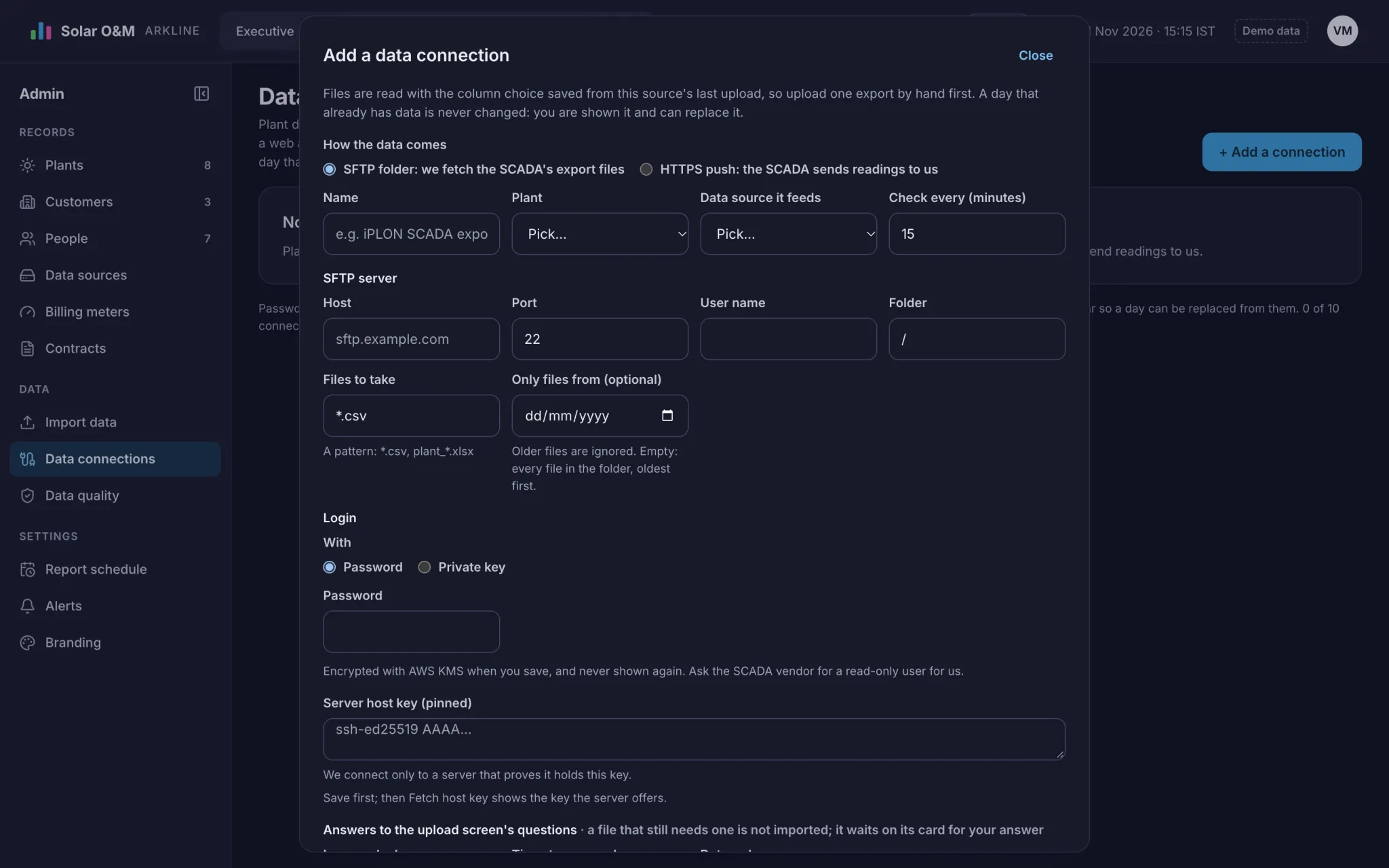
HKDataCrest Solar takes plant data in four ways today: scheduled files over SFTP, files or JSON pushed over HTTPS, and live readings over OPC UA or MQTT. Every connection is read-only. Every source becomes the same 5-minute figures, so a fleet of mixed brands is analysed one way. Direct connections to inverter makers' cloud APIs are in development.
The problem
Every plant speaks a different dialect.
One SCADA exports a CSV at midnight. Another offers OPC UA. A newer site publishes to an MQTT broker. The inverter maker has a cloud portal with its own limits. A solar data platform that only takes one of these leaves half the fleet out, and a plant left out is a plant nobody reports on properly.
What it does
Four ways in, one set of figures out.
-
SFTP files
Every few minutes, a folder on your SCADA's SFTP server is listed, and each new, finished export file is imported once.
-
HTTPS push
Your SCADA posts CSV or JSON to a URL of its own, with its own token. Useful when we cannot reach in.
-
OPC UA
A client reads the nodes an admin has mapped, by subscription or by polling, and turns them into interval rows.
-
MQTT
A subscriber to your SCADA's broker reads the message fields an admin has mapped, buffered into interval rows.
Rules every connector follows
Data comes in. Nothing is overwritten or guessed.
Every connector feeds the same import code a file upload uses. So the rules are the same whichever way the data arrives: units checked against the plant's capacity, clocks set per plant, gaps kept as gaps.
A connector never overwrites a figure already stored. Replacing one is always an admin's explicit choice. A missing value stays missing; it is never turned into a zero.
Passwords and keys for your systems are stored encrypted. A test-connection button checks that a link works without writing anything.
Worked example
One fleet, three plants, three ways in.
Take a made-up fleet of three plants, each with a different SCADA setup. This is how each gets connected, and what happens when one of the links fails.
Plant A: a SCADA that writes files
The SCADA writes a CSV every 15 minutes to a folder on its SFTP server. An admin enters the host, the folder, the file name pattern and a read-only login. On the first connection the server's key is shown so it can be confirmed. From then on, the folder is listed every few minutes. A file still being written is left alone until it is finished, and each finished file is imported once.
Plant B: a SCADA with an OPC UA server
The admin enters the server's endpoint and a read-only account, then maps the nodes that matter: the export energy meter, the plane-of-array irradiance sensor and each inverter's output. Readings arrive by subscription or polling, are buffered, and are written as 5-minute interval rows through the same import as a file.
Plant C: two blocks, two routes
Block 1's data logger publishes to an MQTT broker. The admin subscribes to its topics and maps the message fields. Block 2 is older, and its SCADA can only send data out, so it posts a CSV to a URL of its own with its own token. Each block is a source with its own capacity and dates. The plant's figures are built from both.
When the MQTT link drops
Say block 1's link is down from 10:20 to 11:05. Those 45 minutes of block 1 are missing, not zero. The day is marked partial and its completeness drops by that block's share of the daylight. PR counts sunlight only for intervals where data arrived, so the gap does not drag PR down. If the silence passes the plant's SCADA-down threshold in daylight, the people set for that plant get an alert.
When a file is wrong
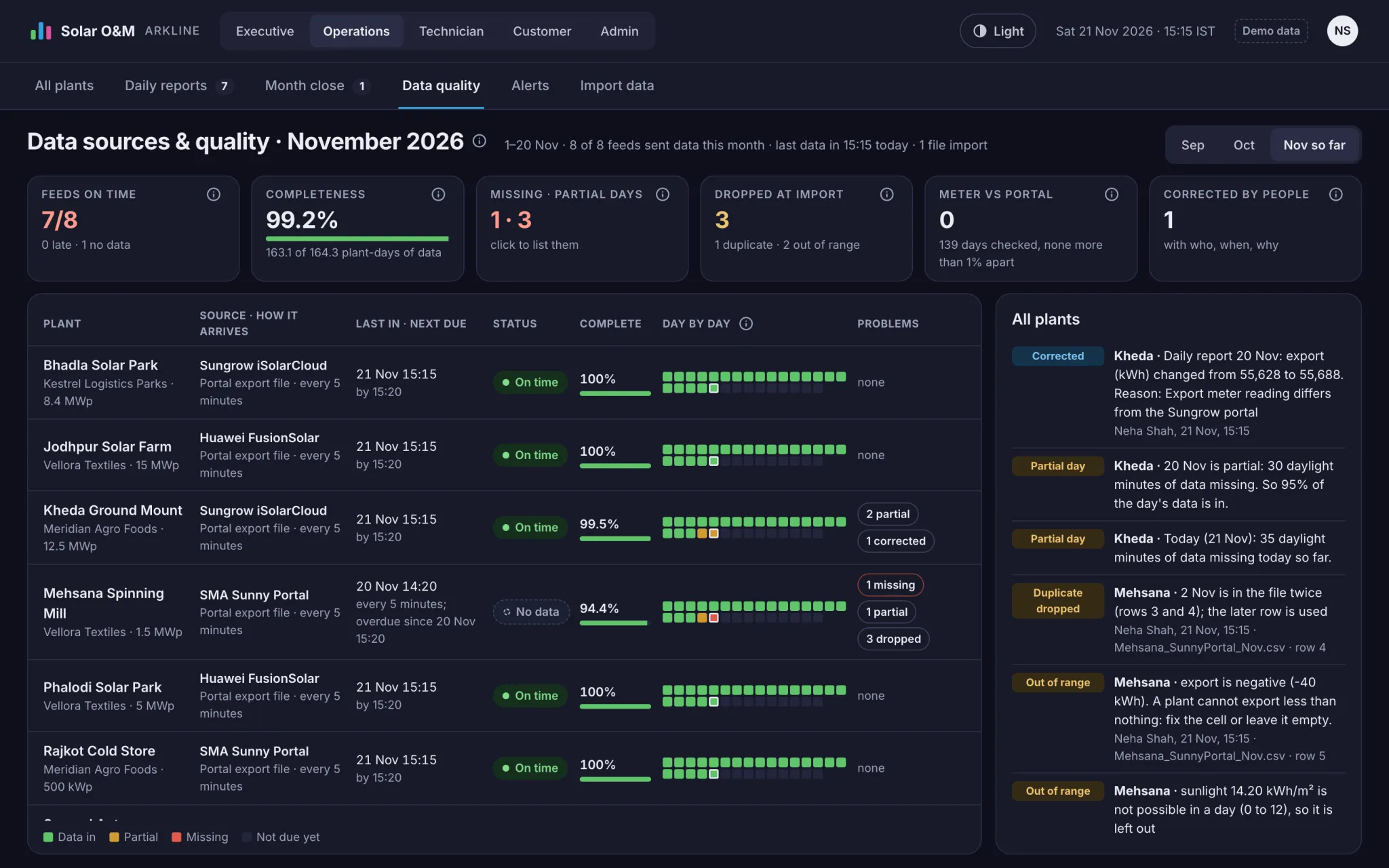
- Duplicate rows are dropped and listed with the file and row they came from.
- Impossible values, such as negative export or a day with more sunlight than physics allows, are left out and listed, never quietly used.
- A figure already stored is never overwritten by new data. Replacing it is an admin's explicit choice, and corrections record who made them and why.
All of this shows on one data-quality page: which feeds are on time, how complete each plant's month is, and what was dropped at import and why.
How it works
Connecting a plant.
Choose the route
Whatever your SCADA or data logger can offer: a file, a push, OPC UA or MQTT.
Test it
Check the connection without writing any data.
Map the signals
Match the plant's energy, irradiance and inverter values to our fields, once.
Let it run
Data flows in on schedule. A late or broken feed shows on the data-quality page and raises an alert.
Questions
Integration questions.
Do you need write access to our SCADA?
No. Every connection is read-only. We never send commands to the plant.
Which inverter and SCADA brands are supported?
Any that can export a file, push data over HTTPS, or offer OPC UA or MQTT. The brand matters less than the route its data can take.
Can you connect to inverter cloud portals?
Connections to inverter makers' cloud APIs, such as Huawei FusionSolar and Sungrow iSolarCloud, are in development. Until then, those plants come in through a scheduled export.
Can one plant have several data sources?
Yes. A plant built in blocks of different brands can have a source per block, each with its own capacity and dates, combined into one plant figure.
What about Modbus or IEC 60870-5-104?
These are usually read on site by the SCADA or a data logger. We take the data from that system by one of the four routes, rather than talking to the devices directly.
Start with whatever is easiest
Tell us what's slowing your business down.
Three easy ways in. All free, all answered by the people who would do the work.
Book a 30-minute call
Talk it through with us. You leave knowing whether a pilot makes sense and what it would cover.
Get a free data check
Send us one export, such as sales, stock or orders. Within 2 working days we send back 3 things we'd fix.
How it worksSend a short note
Three quick questions: what you do, what's not working, and how to reach you.
Write to us