Solar plant monitoring
Solar plant monitoring for every plant, whatever the brand.
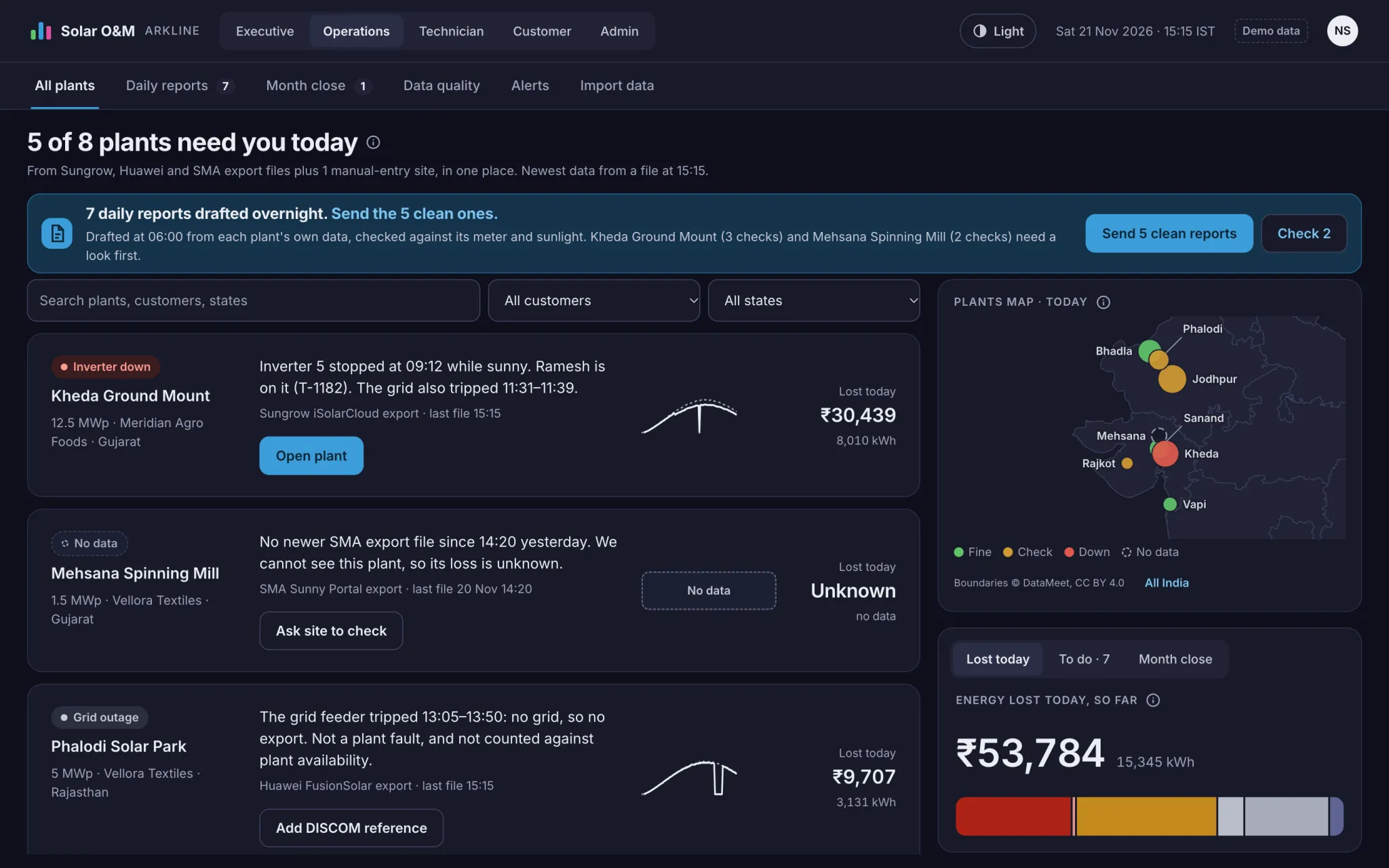
HKDataCrest Solar is monitoring software that puts all your solar plants on one screen, whatever SCADA or inverter brand each one runs. Plants that need attention come first: no data, then warnings, then late data, then the rest. Open a plant to see its inverters and its day curve against what the sunlight should have given.
The problem
Every inverter brand has a portal. None of them shows your portfolio.
A mixed fleet means a morning of logins: one SCADA here, a maker's portal there, a meter someone reads by hand. Each shows its own numbers in its own way. Nobody can say at a glance which plant is losing the most energy right now, or which one has simply stopped sending data.
What it does
One view of the whole fleet.
-
Problems first
The all-plants view sorts by status, then by lowest share of expected. Each plant shows today's energy, % of expected, PR, availability, open tickets and how fresh its data is.
-
The plant, close up
Inverters on a map of the plant, the day's power curve against expected, and every event that cost energy, with its time and cause.
-
Inverters against their peers
Each inverter's output per kWp is compared with its healthy neighbours at the same moment, so a weak inverter or weak strings stand out early.
-
Data you can trust
Late feeds, missing files and gaps are shown, never filled with zeros. A drifting irradiance sensor is flagged before it can hide a real loss.
Monitoring and SCADA
It sits on top of your SCADA, not in place of it.
SCADA controls the plant and records what happened. It is very good at that, and it stays. What SCADA rarely does is compare plants across brands, explain the gap to expected, or tell an O&M head which of forty sites to look at first.
HKDataCrest Solar reads the data your SCADA and portals already collect, read-only, and turns every source into the same 5-minute figures. Then one set of rules applies to every plant: the same expected model, the same loss causes, the same definition of late data.
A plant with only a billing meter can still be monitored day by day: someone enters the reading, and the plant joins the same reports.
How it works
From scattered portals to one screen.
Connect each plant
By SFTP files, HTTPS push, OPC UA or MQTT, read-only. A plant can have several sources, one per block or brand.
Map it once
Inverters, capacity and the irradiance sensor are mapped when the plant is set up, so every figure is per kWp.
Watch the fleet
Figures update as data arrives. Plants with problems rise to the top on their own.
Act on what you see
Raise a ticket from the plant view. Alerts reach the team when a plant trips or goes quiet.
Questions
Monitoring questions.
Is this a SCADA system?
No. It does not control the plant. It reads the data your SCADA, inverter portals or meters already produce and adds the fleet view, the analysis, alerts, field work and reports.
How often do the figures update?
Plants on a live feed (OPC UA, MQTT or frequent pushes) are worked out in 5-minute intervals as the data arrives. Plants that send a daily file are updated when the file lands, and flagged as late if it doesn't.
What happens when the data stops?
The plant moves up the list as late or no data, and a SCADA-down alert goes to the people set for that plant. Missing time is shown as a gap, never as zero generation.
Can it monitor a plant with no data connection?
Yes, at a daily level. A technician or engineer enters the meter reading, and the plant appears in the same views and reports as the connected ones.
Does it work for rooftop and C&I plants as well as utility scale?
Yes, as long as the plant's data can be sent out in one of the supported ways. The same figures apply at any size.
Keep going
Related.
Start with whatever is easiest
Tell us what's slowing your business down.
Three easy ways in. All free, all answered by the people who would do the work.
Book a 30-minute call
Talk it through with us. You leave knowing whether a pilot makes sense and what it would cover.
Get a free data check
Send us one export, such as sales, stock or orders. Within 2 working days we send back 3 things we'd fix.
How it worksSend a short note
Three quick questions: what you do, what's not working, and how to reach you.
Write to us